How to automate a Facebook Page (without getting restricted)
Most Facebook automation guides are written by tool vendors, and some of the tactics they list can get a Page restricted. We publish through the official Pages API and passed Meta App Review — here is where Meta actually draws the line, and how to automate the safe way.
Search for Facebook Page automation and almost everything you find is written by a tool trying to sell you Facebook Page automation. The advice is not wrong, exactly. It is just incomplete in a dangerous way: very little of it tells you where Meta draws the line, and some of the tactics those articles list can get a Page restricted.
We build a scheduler that publishes to Facebook through Meta’s official APIs, and in July 2026 our app went through Meta App Review and came out approved. That process forces you to learn exactly what Meta permits, because a reviewer watches your app do it. This post is what we learned, minus the sales pitch.
What counts as Facebook Page automation?
Facebook Page automation is software doing Page work on a schedule or trigger instead of a person doing it live: publishing queued posts, pushing new blog articles to the Page, replying to comments, and pulling performance numbers. Meta supports all of that through its official Pages API — and separately bans a second family of “automation” that fakes human engagement.
That split is the whole subject. Most guides blur it. Meta does not.

What Meta officially lets you automate
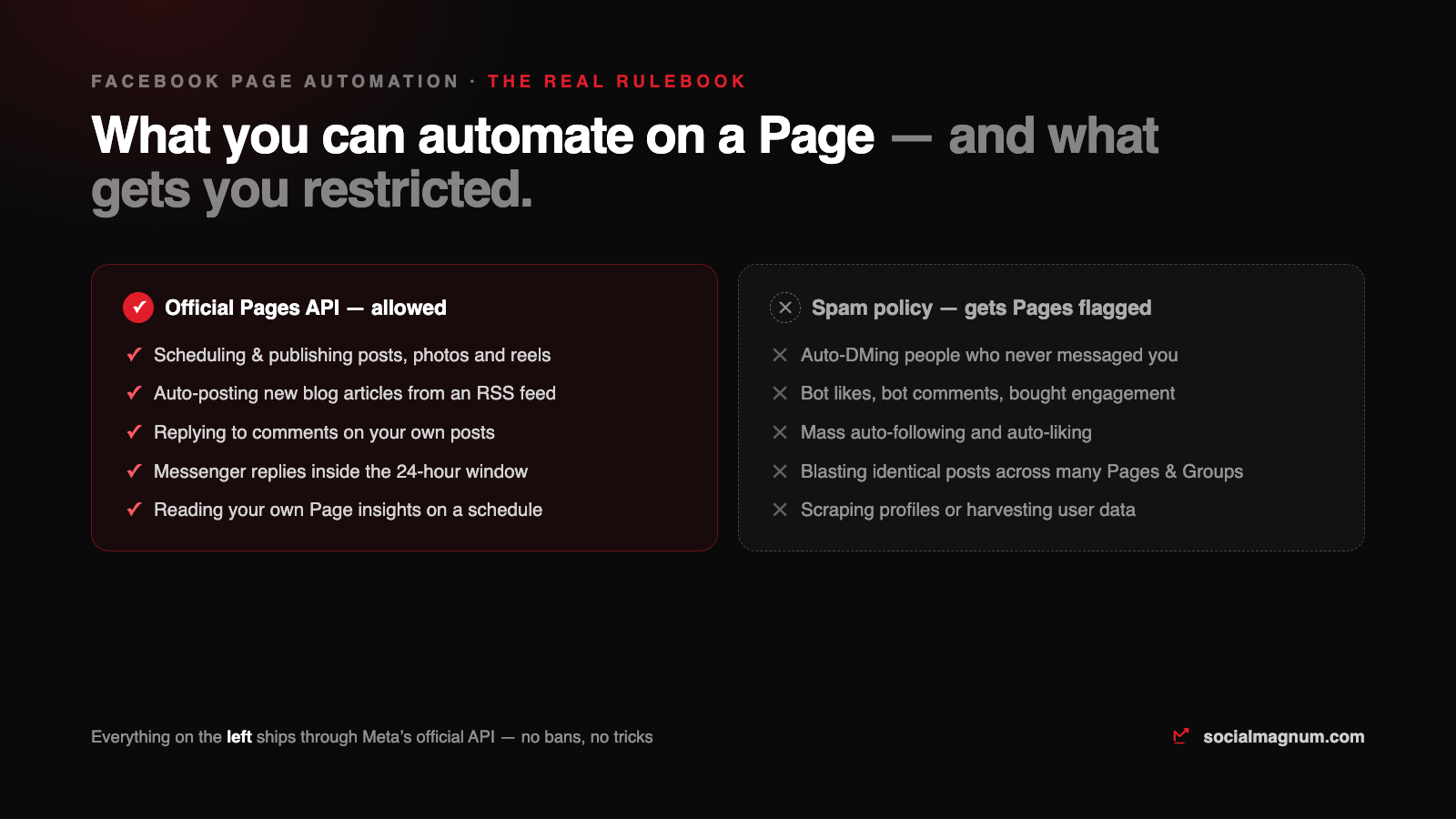
Everything in this table runs through the Pages API, the same surface Meta’s own Business Suite uses. Nothing here risks your Page, because it is the sanctioned path.
| Task | Allowed? | How it works |
|---|---|---|
| Scheduling and publishing posts, photos, reels | Yes | Content publishing endpoints. This is the core of every legitimate scheduler. |
| Auto-posting new blog articles (RSS) | Yes | A poller reads your feed and publishes new items through the same endpoints. |
| Replying to comments on your own posts | Yes | Comment endpoints on Page-owned objects, with the standard Page permissions. |
| Messenger replies | Within 24h | Automated replies are fine inside the 24-hour window after a person messages you. Cold outbound is not. |
| Reading your own Page insights | Yes | Insights endpoints. Pulling your numbers nightly is normal and expected. |
| Auto-DMs to people who never messaged you | No | Outside the messaging window. This is where “automation” becomes spam. |
| Bot likes, bot comments, bought engagement | No | Fake engagement, named explicitly in Meta's spam policy. |
| Mass auto-follow / auto-like tools | No | Same policy family. These tools also need your password, which is its own problem. |
| Blasting identical posts across Pages and Groups | No | Repetitive, duplicated content is the textbook definition in the policy. |
The banned half is spelled out in Meta’s spam policy: fake engagement, deceptive amplification, repetitive duplicated content. When you read a horror story about a restricted Page, the cause is almost always in that list — not scheduling.
What the official route actually involves
Knowing what happens under the hood makes the safe-versus-banned split obvious, so here is the short version of what any legitimate tool does.
- You grant permissions, not your password. Connecting a Page is an OAuth screen listing exactly what the app may do. Any tool that asks for your actual Facebook password is automating a logged-in browser, which is against the platform terms and how accounts get compromised.
- The app must pass Meta App Review. Publishing permissions are not granted by default. A reviewer requires a screen recording of the app using every permission it requests, on a real Page, before the app can serve the public. Ours passed in July 2026; it is genuinely checked, not a rubber stamp.
- Each Page gets its own access token. Software posts with a Page-scoped credential, so its reach is limited to the Pages you connected, and revoking it takes one click in your settings.
Setting up safe automation, step by step
This is the shape of the setup in any legitimate scheduler, ours included. Ten minutes, once.
- 1. Connect the Page over OAuth. Log in through Facebook’s own dialog, pick the Pages, and check the permission list before approving it.
- 2. Queue real posts. Write a week of content and schedule it at the times your audience is actually awake. This alone is most of the value of automation.
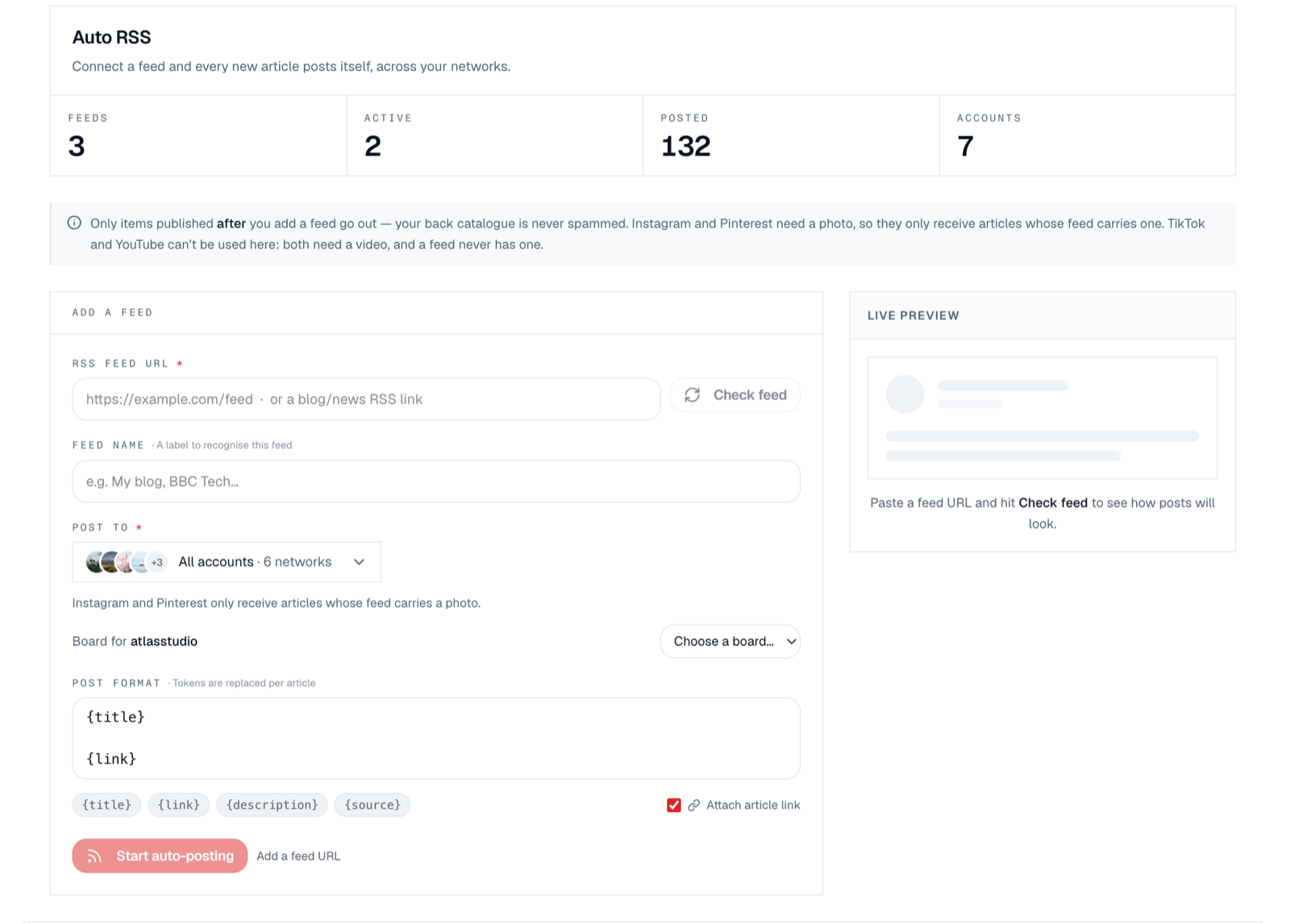
- 3. Point your blog’s RSS feed at the Page. Every new article then posts itself with the title and link, minutes after it goes live.
- 4. Leave comments to a human — but in one place. Automation should collect conversations, not conduct them. A shared inbox brings every Page comment to one queue; the replies stay yours.
Auto-posting from a blog: how the plumbing behaves
RSS is the oldest and still the best-behaved form of Page automation, but the details matter, and this is where first-hand experience beats a feature list. Two behaviours of our own pipeline are worth copying if you ever build or evaluate one:
- Polling is minutes, not instant. Our poller checks every feed on a 15-minute cycle. Any tool quoting “instant” RSS posting is polling on a timer too — RSS has no push.
- Only items published after you connect should go out. We enforce this deliberately, because the alternative is a tool dumping your ten-year back catalogue onto the Page on day one — which lands you in exactly the repetitive-content territory the spam policy describes.
Does automation hurt your reach?
The most persistent myth in this space is that Facebook punishes scheduled or third-party posts. Think about what it would imply: Meta ships its own scheduler in Business Suite and licenses an official API for exactly this purpose. Punishing the behaviour it builds tools for would make no sense, and Meta’s own help centre documents scheduling as a normal Page feature.
What actually costs reach is the content pattern automation makes easy: identical text blasted everywhere at once, engagement-bait, a Page that posts on schedule but never answers a comment. The scheduler is not the problem. Using it to behave like a robot is.
The five mistakes that actually get Pages in trouble
- Buying engagement to feed the algorithm. Fake likes and comments are the most-cited item in the spam policy, and detection is Meta’s home game.
- Giving a bot your password. Browser-automation tools that drive a logged-in session violate the terms and hand your whole account to a third party, not one Page.
- Cross-posting the identical caption everywhere. Duplicate content across Pages and Groups is named in the policy. Vary the text per destination; it also simply performs better.
- Letting the queue outlive the token. Page tokens expire when passwords change or permissions get revoked, and a dead token fails silently in most tools. Ours checks every connection hourly and flags reconnects before the queue starts failing; whatever you use, make sure something does.
- Automating the posts and abandoning the comments. A Page that publishes daily and never replies reads as a billboard. Route the replies the same way you routed the posting — collected into one queue by software, answered by a person. If a teammate runs that queue, give the posting side a proper approval workflow too.
The short version
- 1
Scheduling, RSS auto-posting, comment replies and insights are all officially supported Page automation — they run through Meta's Pages API, the same surface Business Suite uses.
- 2
The banned family is fake engagement: auto-DMs to strangers, bot likes and comments, mass follow tools, and identical posts blasted across Pages and Groups.
- 3
Legitimate tools connect by OAuth with per-Page tokens and pass Meta App Review — a tool that wants your password is automating a browser and risking the account.
- 4
Scheduled posts are not penalized; robotic content patterns are. Meta ships its own scheduler.
- 5
Watch the failure modes: expired tokens killing queues silently, and back-catalogue dumps from careless RSS tools.