How to set up a social media approval workflow
Approval workflows fail two ways: the intern's typo goes live, or every post dies waiting for sign-off. We built ours around the piece most guides skip entirely — what happens when the scheduled time arrives and the reviewer never showed up.
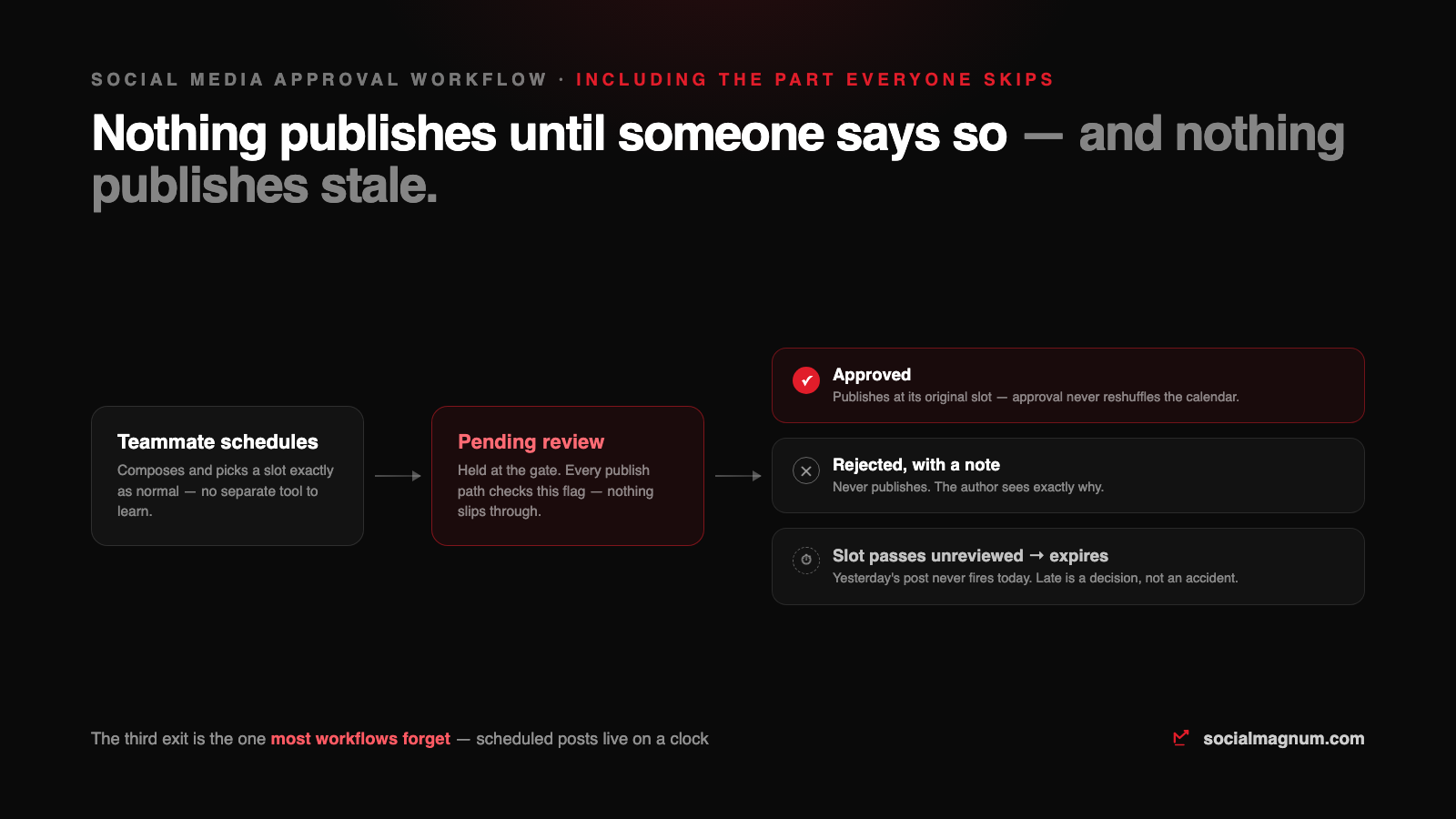
A social media approval workflow has exactly two failure modes. The first is famous: the wrong post goes live, and a junior teammate’s typo becomes the brand’s problem in public. The second is quieter and more common: the process meant to prevent that turns into a queue where every post dies waiting for sign-off, and the calendar slips week after week.
We built an approval system into our own scheduler, which forced us to answer the questions most guides gloss over — including the one almost nobody covers: what happens when the scheduled time arrives and the reviewer never showed up. This is the full setup, with the answers.
What is a social media approval workflow?
A social media approval workflow is a rule that certain teammates’ posts do not publish until someone signs them off. The post is written and scheduled as normal, then held in a pending state; a reviewer approves it, rejects it with a note, or — in the case every workflow forgets — lets the deadline pass, and the system has to decide what happens next.

Gate people, not the team
The biggest design mistake in approval workflows is making them universal. If every post from every person needs sign-off, your most senior person becomes a bottleneck for their own team’s work, and reviewers start rubber-stamping to clear the queue. A gate everyone passes is a gate nobody guards.
Approval should be a property of the person, not the workspace. The new intern posts through review; the manager who has run the accounts for three years posts directly. In our implementation that is literally a per-member toggle — set when you invite someone, and flippable later from the team page as trust grows. The workflow then disappears for everyone it does not apply to: gated members see “Submit for approval” where everyone else sees “Schedule”, and that is the only difference they ever notice.
Four decisions to make before you touch a tool
- 1. Who needs the gate? New members, freelancers, anyone posting to a client account for the first month. Not the whole team.
- 2. Who approves? One named person per workspace, with a backup for holidays. The standard advice describes multi-step chains — legal, then brand, then the director — and for a regulated industry that is right. For everyone else, every extra step is a day of latency on a post about a coffee promotion.
- 3. What happens at the deadline? The question that separates real workflows from diagrams. A scheduled post lives on a clock; decide now whether an unreviewed post publishes anyway or expires. (It should expire. More below.)
- 4. What does a rejection look like? If a rejected post just vanishes, the author learns nothing and resents the process. A rejection must carry a note the author actually sees.
The setup, end to end
In a tool with per-member approval built in, the whole thing is three steps: flag the members who need review when you invite them, tell your reviewer where the queue lives, and let everyone schedule exactly as they always did. The pending posts collect in one desk — author, account, network and scheduled time visible on every card — and the reviewer clears the queue in one sitting, one decision per post.
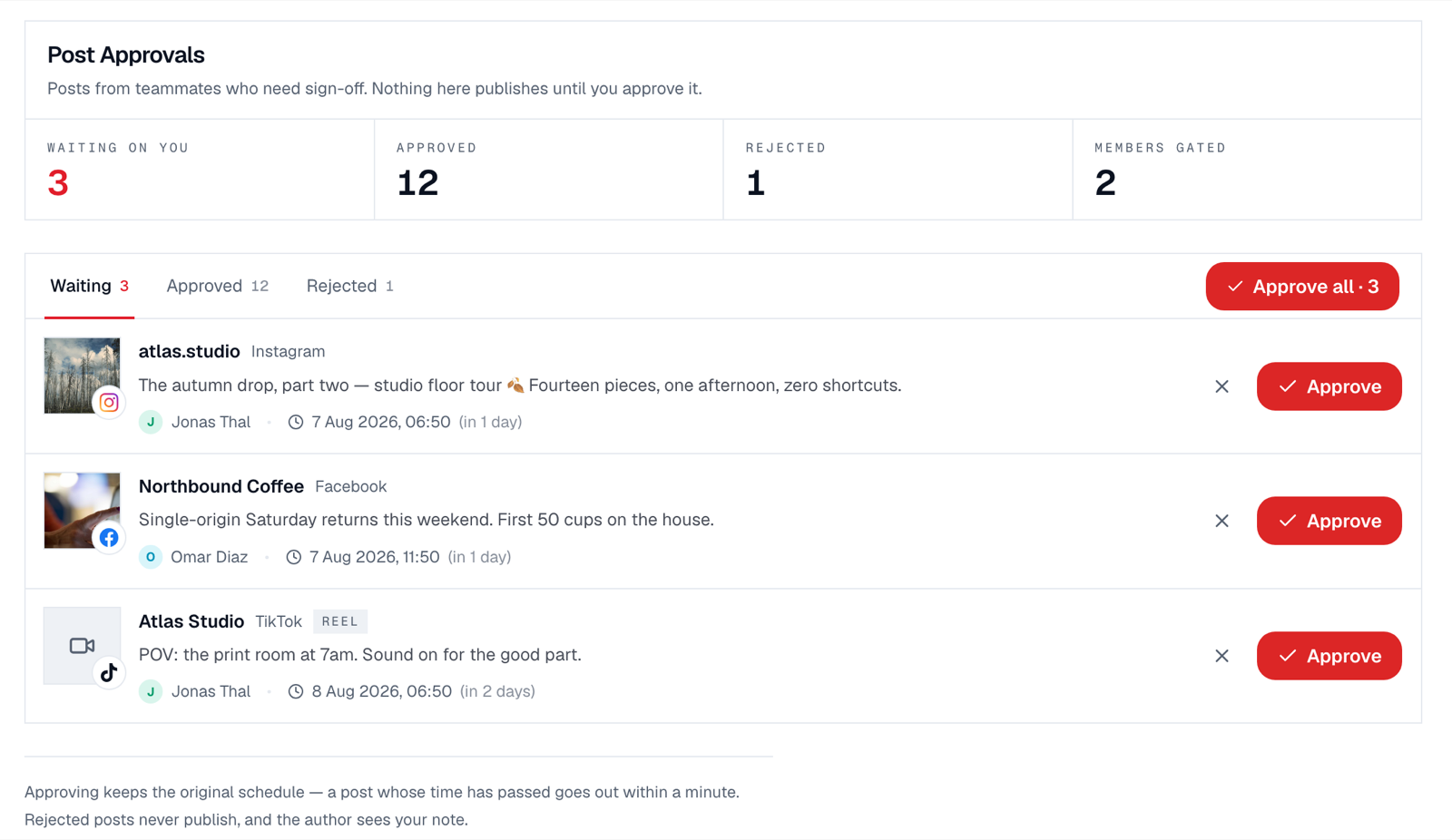
Two details in that screen matter more than they look. The counts across the top keep the queue honest — a reviewer who sees “waiting on you: 3” at 9am clears it with coffee; one who discovers 30 on Friday rubber-stamps. And the schedule is never the reviewer’s problem: approving keeps the post’s original slot, so review decides whether, never when.
The deadline: the part every guide skips
Search this topic and you will find the same flowchart on every vendor blog: draft, review, approve, publish. The diagram has no clock in it. Scheduled posts do.
One gate, five doors
Here is the engineering reality behind the diagrams: a modern scheduler does not have one way to publish. It has several, and an approval workflow that only guards the compose button is a fence with four gaps in it. When we built ours, the gate had to be checked in five places:
| Publish path | Gated? | Why it's easy to miss |
|---|---|---|
| The composer (schedule button) | Yes | The obvious one — every tool gates this. |
| The scheduler itself (cron) | Yes | The thing that actually fires posts must re-check at publish time, or an approval revoked late is ignored. |
| Bulk CSV import | Yes | A spreadsheet of 200 posts from a gated member is 200 pending posts, not a side door. |
| RSS auto-posting | Yes | Automated sources a gated member configured inherit the member's gate. |
| The background safety-net publisher | Yes | Redundant publishers exist in most tools; each one is a chance to forget the check. |
The path most likely to be forgotten is bulk import — and a workflow with one ungated path is not a workflow, it is a suggestion. This is the same lesson as automating a Facebook Page: the system-level behaviour, not the button, is what actually protects you.
Keeping review fast enough that people keep using it
- One approver, one sitting. A queue cleared daily at a fixed time beats instant-notification review — batching is faster for the reviewer and predictable for authors.
- Approve-all exists for a reason. When a trusted member submits five parts of one campaign, five identical clicks teach the reviewer to resent the tool.
- Rejections teach. A one-line note — “price is wrong, we moved to $24” — turns a rejection from a slap into an edit request. The author fixes and resubmits without a meeting.
- Graduate people out. The gate is training wheels, not a caste system. When the intern’s last twenty posts sailed through, flip the toggle off.
The mistakes that kill approval workflows
- Gating everyone — the CMO waiting on their own intern for sign-off is how the whole system gets abandoned in month two.
- Review in a group chat. Screenshots in a thread have no state: nobody knows what was approved, and the post still has to be scheduled manually afterwards — which is where the typo sneaks back in.
- No deadline behaviour. If your tool publishes unreviewed posts when the slot arrives, the gate is decorative. If it holds them forever, your calendar quietly rots. It should expire them, visibly.
- Approval as editing. Reviewers who rewrite posts in the queue become the team’s copywriter. Reject with a note; let the author stay the author.
The short version
- 1
Approval is a property of the person, not the workspace: gate the new and the external, let trusted people post directly, and graduate people out as trust grows.
- 2
Decide the deadline behaviour first. Unreviewed posts should expire when their slot passes — never publish stale, never publish ungated.
- 3
Approving must keep the original schedule; review decides whether, never when.
- 4
A real workflow gates every publish path — composer, scheduler, bulk import, RSS, background publishers — not just the compose button.
- 5
Speed is the survival condition: one approver, batched daily, approve-all for campaigns, and rejections that carry a note.